iOS App · iPad
Offline Team Inspection App
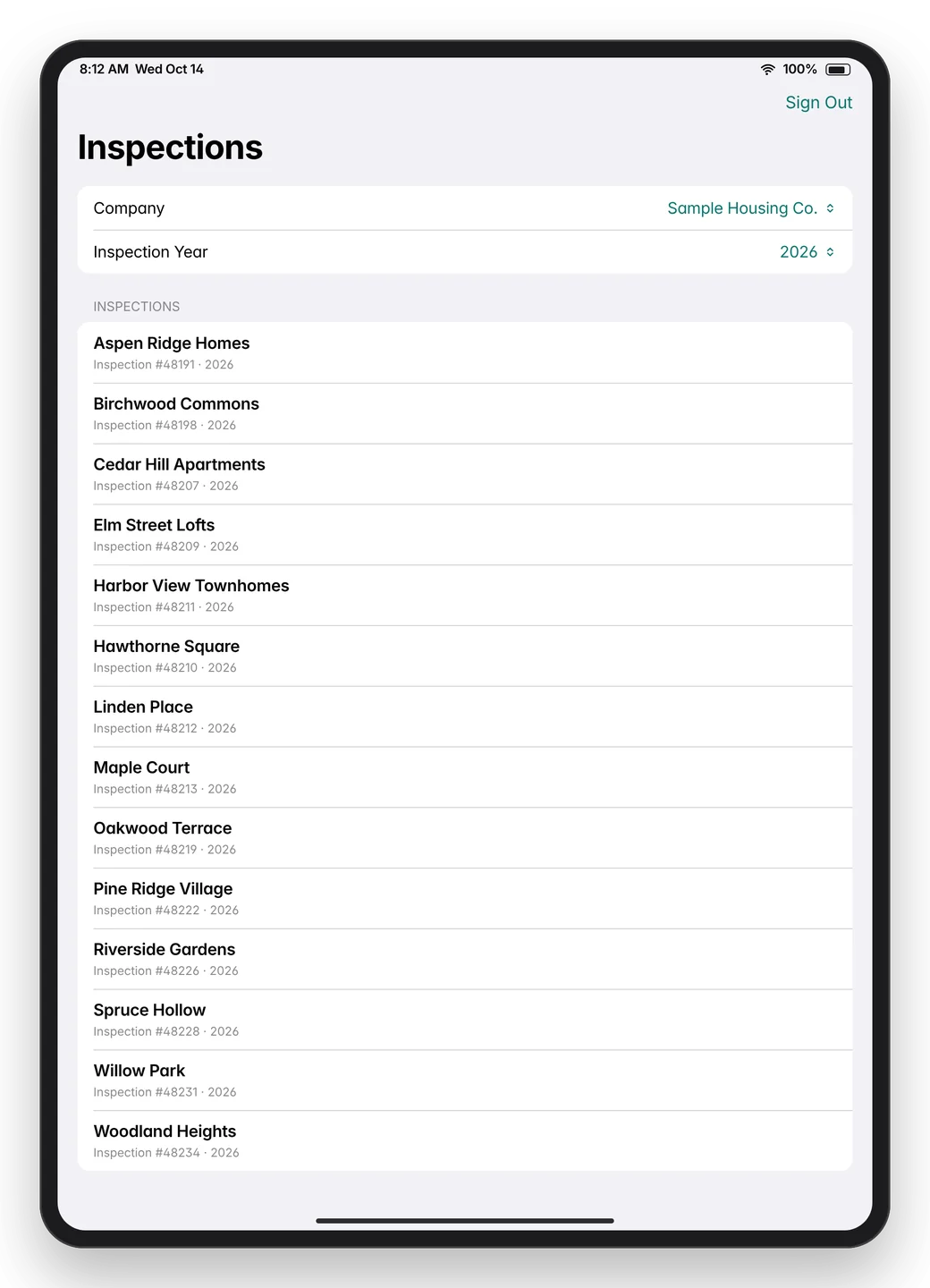
Complete inspections on an iPad with or without signal, then sync them back without losing anyone's work.
One of three native iOS apps I designed and built for the housing inspection market between July and October 2026. They follow NSPIRE, HUD's physical inspection standard for public housing, multifamily and voucher properties, which began replacing the older standards in 2023.
- Platform
- iPad (iPadOS 17+)
- Who uses it
- Field inspectors at a national housing inspection consultancy and its client organizations
- Status
- Built and in TestFlight. Go-live waits on the client's web API, which I specified for their developer.
- Code
- 3,860 lines of Swift, 41 automated tests
The problem
A national housing inspection consultancy runs a web-based inspection platform used by its own inspectors and its clients' inspectors. Every tap on the site is a round trip to the server, so it stops working in basements, mechanical rooms and buildings without coverage.
The consultancy wanted a native iPad app that captures the whole inspection offline and syncs back to the website, which stays the system of record. With several inspectors often working the same property, the sync could never drop or overwrite anyone's findings.
What it does
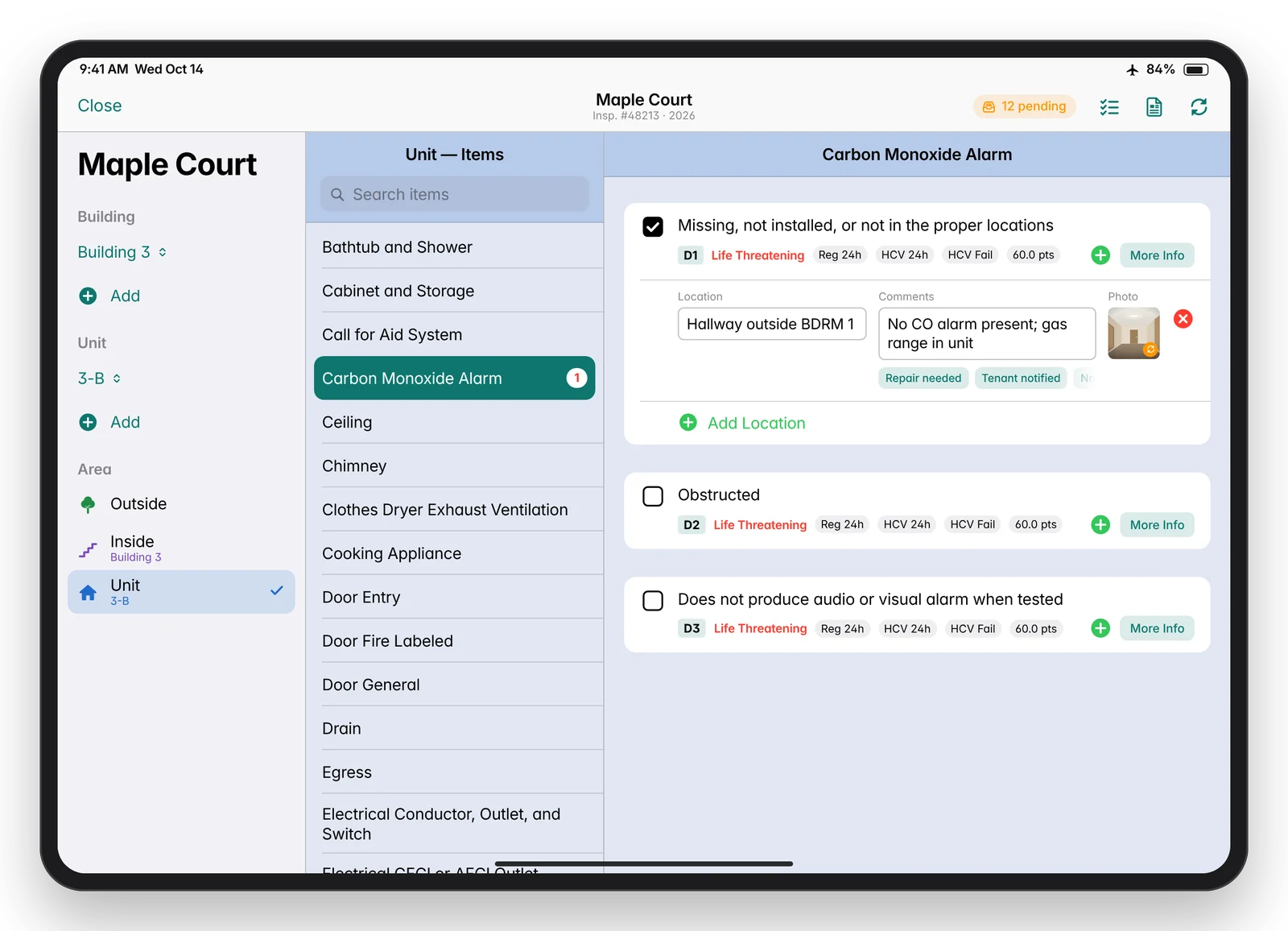
- Three-column inspection form built for landscape iPad: pick the building, unit and area on the left, the inspectable item in the middle, and record defects on the right.
- The standard's full defect catalog on the device: 65 items and 432 defect rows, each with its D-number, severity, regular and voucher (HCV) correction times and area-specific points, plus four sections of reference text per defect. All of it works with no signal.
- One-tap capture with locations, comments, one-tap canned comments and photos for each defect. No Save buttons: every edit saves itself.
- Color-coded areas (Outside green, Inside purple, Unit blue) at the client's request, with the same rules as the website for when each area opens (Inside needs a building, Unit needs a unit).
- Photos from the camera or library, resized to a 2048 px long edge, compressed to 2 MB or less and stripped of GPS data, then queued until they can upload.
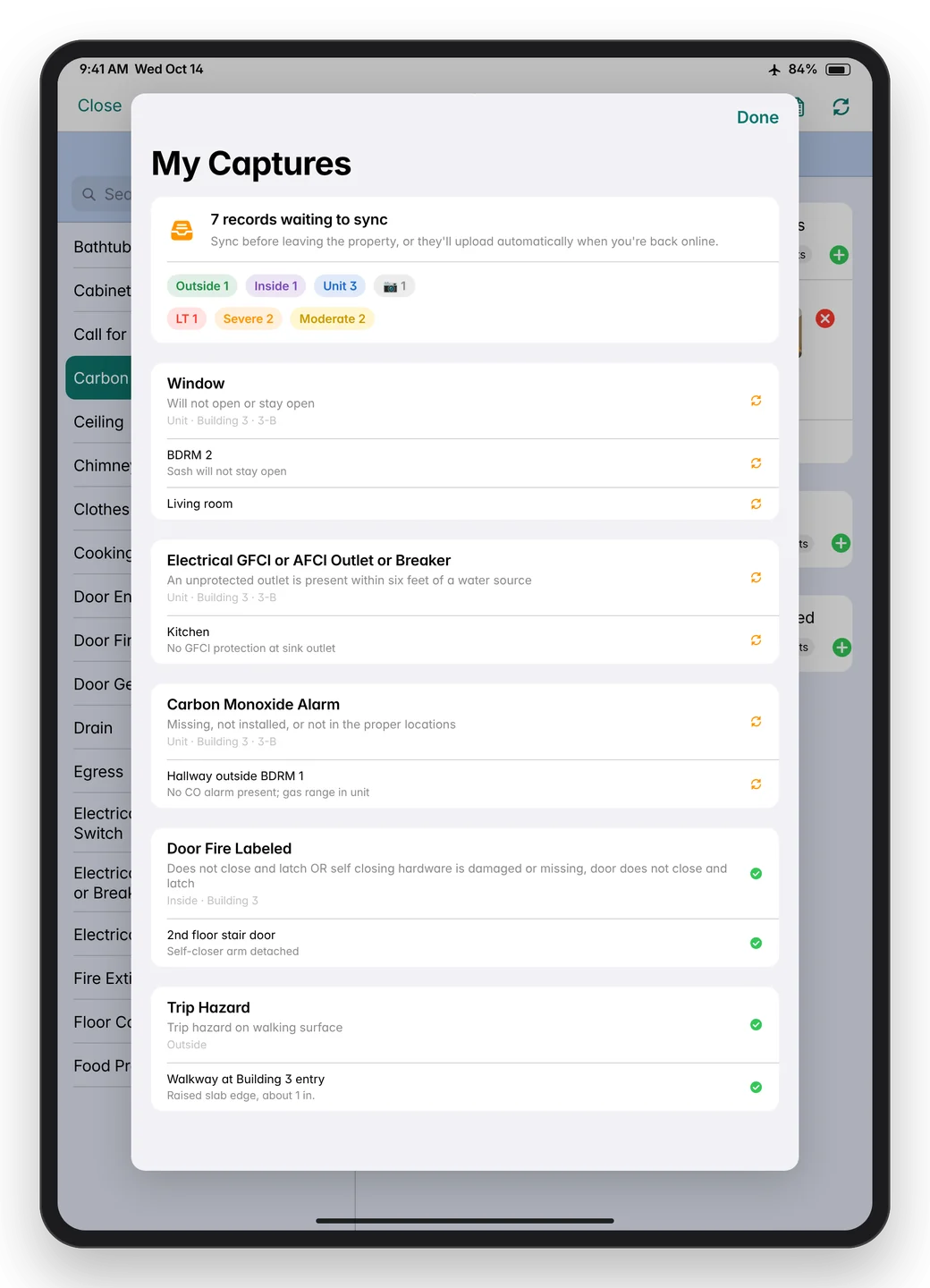
- Sync status at a glance and a My Captures hand-back check that tells the inspector whether everything is safe on the server before leaving the property.
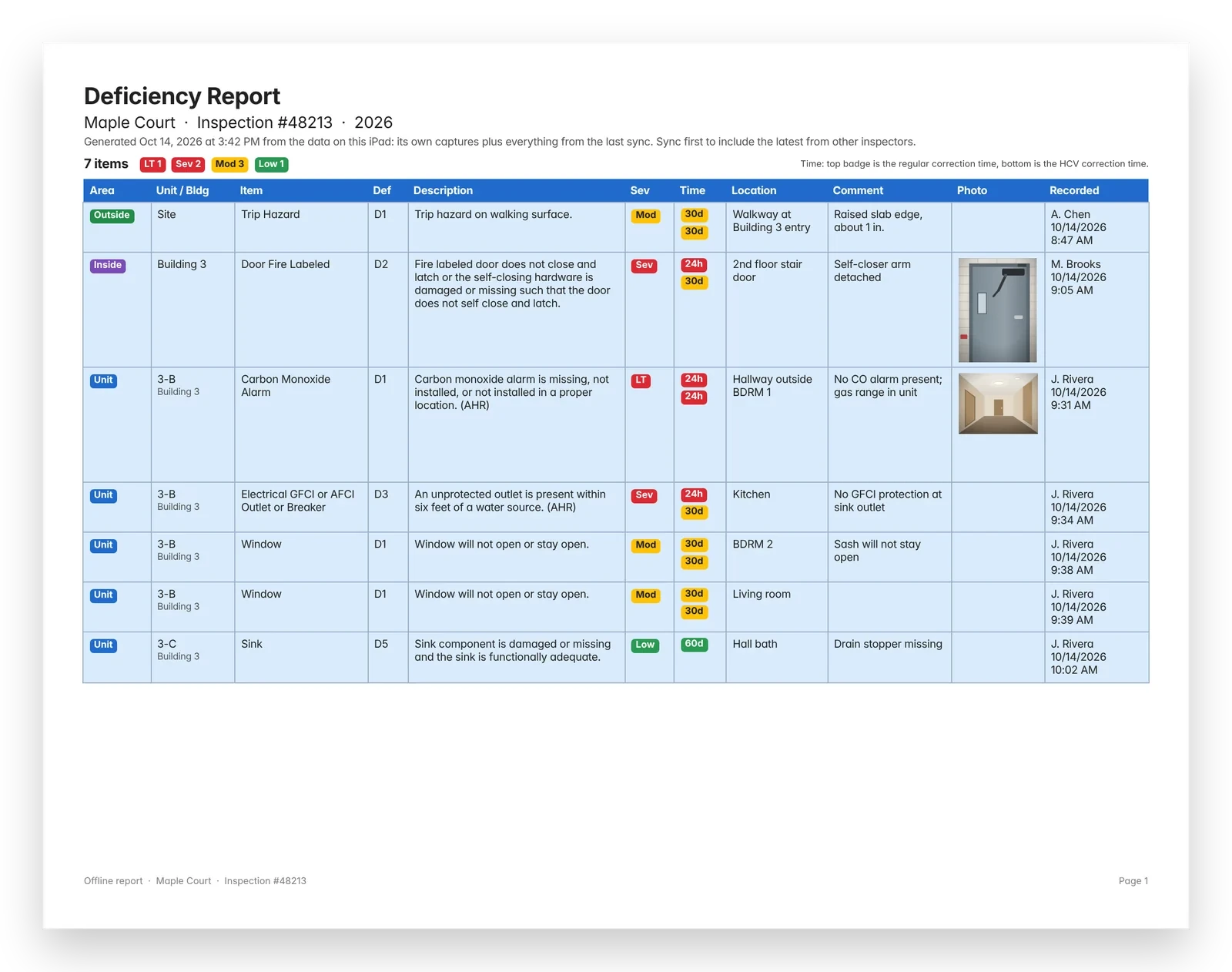
- Two offline PDF reports: the Full Deficiency Report and the 24-Hour List (Life-Threatening and Severe), laid out like the website's reports and shared to Mail, AirDrop, Print or Files.
- Roles and inspection locks that mirror the website's own rules.
Screens
Screens shown with sample data. They're mockups redrawn from the real app layouts, and every property, unit, person and inspection number in them is made up.
How it's built
- SwiftUI views over @Observable stores, a local SQLite database through GRDB, a sync engine, and an API client protocol with seven calls. Today a built-in mock server implements that protocol; switching to the live API changes only the transport.
- Offline journal (outbox pattern). Every capture writes the record and an "intent" to an append-only journal in the same database transaction, so nothing is lost if the app is closed or the battery dies. Sync replays the journal in order, and replaying the same changes twice is harmless.
- Identity across the offline gap. Buildings, units, defects and locations created offline get their own IDs on the device, which the server maps to its IDs when it accepts them.
- Merge without overwriting. Downloads from the server never overwrite edits still waiting on the iPad, so two inspectors on the same property don't lose each other's work.
- Photos wait for their records. A photo uploads only after the location it belongs to exists on the server.
- Native PDF reports drawn with UIGraphicsPDFRenderer on a background thread, with row heights measured from the wrapped text and small photo thumbnails to keep files light.
StackSwift 5, SwiftUI, Observation, GRDB 7 (SQLite), Swift concurrency, PhotosUI, UIKit PDF rendering, PDFKit, XCTest, Xcode 16, iPadOS 17+.
Engineering highlights
- Audit first. Capturing every write the website makes showed exactly what the app had to reproduce, and gave the client's developer fixes to make before the app relied on that path.
- A mock server that doubles as the spec. It enforces the same rules the real server must (locks, roles, idempotent replay), and the client's developer builds against it.
- API built together with the client's developer over five rounds of sample data plus two login samples. All 3,851 timestamps were checked for correct UTC conversion, including across the daylight-saving change.
- Source data kept exactly as the client has it. When analysis turned up questionable values in a few catalog rows, they went back to the client as questions instead of being quietly patched in the app.
By the numbers
| Measure | Value |
|---|---|
| Defect catalog on the device | 65 items, 432 defect rows, 227 reference texts |
| Offline change types in the journal | 10 |
| Photo budget | 2 MB or less, 2048 px long edge, GPS removed |
| Requirements, design and API documents | 7 documents, about 1,450 lines |
| App code and tests | 3,860 lines of Swift, 41 automated tests |
| Planned rollout | Private distribution to company-owned iPads |
Status
Built and in TestFlight. The full capture, sync and reporting flow works end to end against the mock server. Production rollout waits on the client's web API, which is fully specified (write-side spec v1.5).
How I build: AI-assisted development
I start from the client's real workflow (their website, their paper form, their old app), write down the requirements and design, and build offline-first against a mock of the server so the whole app can be tested early. I work with Claude Code as an AI pair programmer: it writes code, tests and documents, independent AI reviewers check the code, and I build and ship each release myself. Typical client change requests go from email to a test build in a day or two.